GoPro Log Color Management Accuracy Testing
Scope
My goal here is to test the accuracy of the various color management options I am aware of for GoPro Log.
Background
GoPro introduced the option to record in a log format with the GP11 and Labs firmware. They have documented the log tone curve very well and even let you change the curve if you wish.
However the 'Wide Gammut' used in the Log setting in the GP12+ (and an option in the GP11) is undocumented. So it is not possible to use GP-Log in a fully color managed workflow without some additional work. The GP Mission promises to solve this problem by using Rec2020 primaries and a new, documented, tone curve GP-Log-2
These are the 4 contenders
Official LUT
GoPro published a free Log to Rec709 LUT here. Do note the LUT changed with firmware versions, older versions used a -2EV exposure in camera and the LUT pushed it back up 2 stops.
Thatcher DCTL
Thatcher Freemen has a wide range of amazing tools on their Github, some being color space conversion DCTLs. This is their's to convert GP-Log to DWG/I
XtremeStuff DCTL
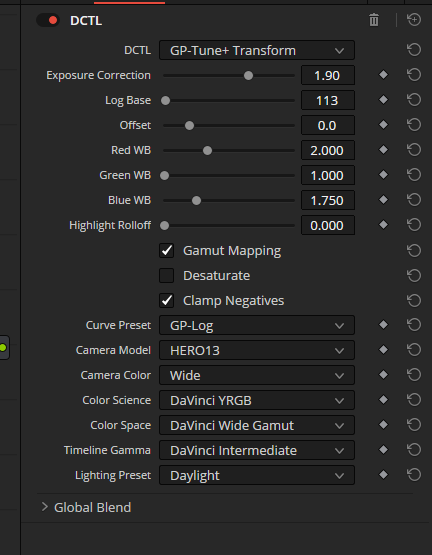
XtremeStuff sells a DCTL that supports basically the full range of GP products and allows conversion to a variety of output color spaces.
Note they have a free DCTL on their github page as well, this does NOT include the Wide Gammut used in the GP12+ Log preset. But if users want to 'roll their own' log with Labs and not use wide gammut, this free tool would be a consideration. I did not test this here.
Python LUT
I have produced a Python tool that automatically generates LUTs to convert from any camera space to DWG/I using a series of stills of color charts. The program is detailed here. This is LUT is 'Python LUT' in my tables.
Methodology
This article will do CIE2000 accuracy tests using Babel Color's Patch Tool to compare the accuracy of these on the X-rite Passport Checker Video.
The chart was lit with a high CRI LED light and the GP13 white balance set to match the light temperature, 6500k, a test shot taken and the GP WB tweaked so the R,G,B values were balance on the gray chip in Resolve scopes.. As the GP doesn't really have any proper metering tools, a best guess exposure was taken and we will normalize all the methods to minimize the exposure error.
Patch Tool lets you highlight the test patches and it reads the sRGB values out of the 8 bit png from Resolve (Patch Tool refuses 16 bit tiffs). These are compared against the LAB values X-rite published for the color chart.
I previously tested using my 140 chip X-rite SG chart, but many of its chips exceed the rRGB color space, so I don't know of anyway to bring the image from resolve to Babel accurately. The 24 chips of the Passport Video are all within sRGB, so we won't make any additional error.
That shot is brought into Resolve. The automatic color management is off and we will build it manually with the LUTs and CSTs
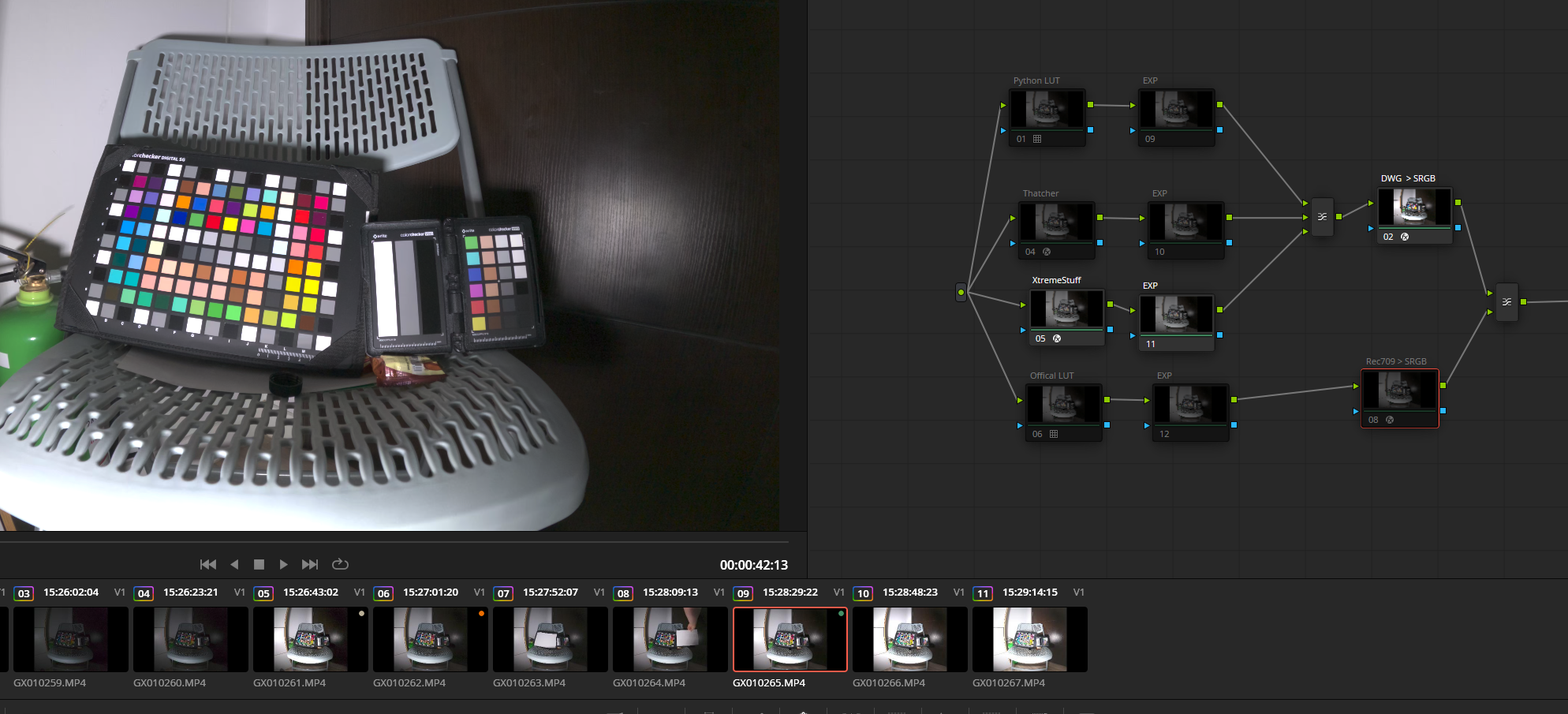
All 4 of these go to a layer mixer, so we can disable all but one row, grab a still of that and bring it into Patch tool to test. And repeat for the other 3.
The 'Exp' node was used to tweak each conversion so its middle gray output matched the value expected by Babel as close as possible. This was done with Global wheel in HDR palette, and the color space settings in the palette set correctly.
Stills of the chart converted to sRGB are exported from Resolve and brought into Patch Tool. This calculates the CIE2000 numbers against the LAB values published by X-Rite.
As a second test we take a shot of the chart with shutter time 2 stops under exposed. This shot is converted in resolve as before and a +2ev exposure shift applied with HDR palette. If the conversion was accurate, the chip values of this chart should now match the 0EV shot.
We ask Patch Tool to compare these two and these are the results.
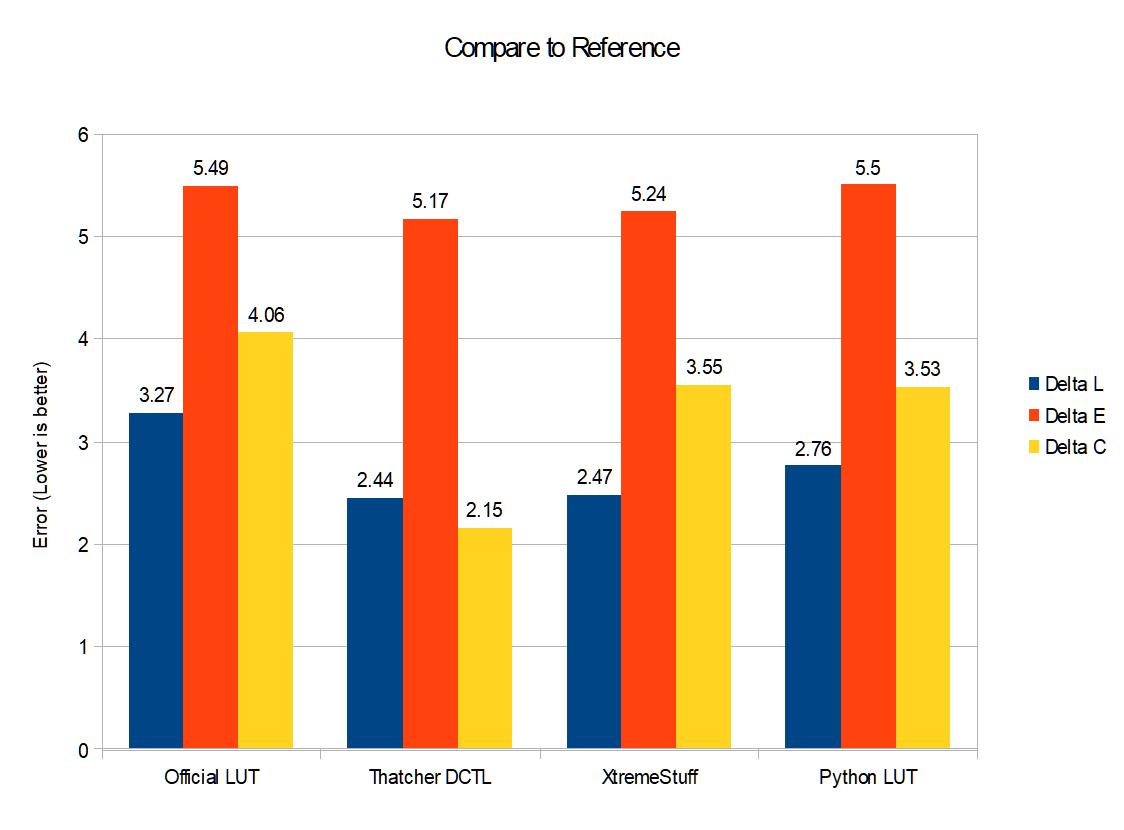
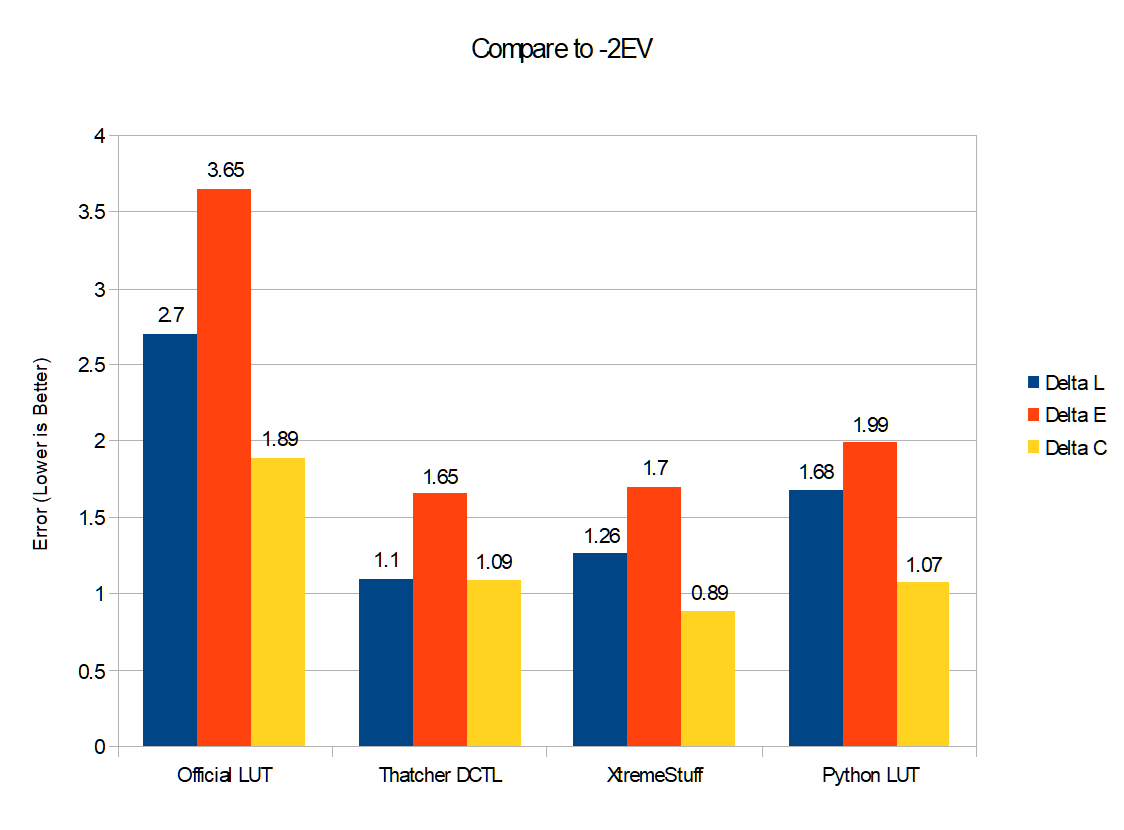
| CST Method | Compare to Reference | ||
|---|---|---|---|
| Delta L | Delta E | Delta C | |
| Official LUT | 3.27 | 5.49 | 4.06 |
| Thatcher DCTL | 2.44 | 5.17 | 2.15 |
| XtremeStuff | 2.47 | 5.24 | 3.55 |
| Python LUT | 2.76 | 5.5 | 3.53 |
| CST Method | Compare to -2EV | ||
|---|---|---|---|
| Delta L | Delta E | Delta C | |
| Official LUT | 2.7 | 3.65 | 1.89 |
| Thatcher DCTL | 1.1 | 1.65 | 1.09 |
| XtremeStuff | 1.26 | 1.7 | 0.89 |
| Python LUT | 1.68 | 1.99 | 1.07 |
Conclusions
The Official LUT from GP is convenient for some as it converts directly to Rec709, but this is also problematic as you can't work in a common color space (such as DWG/I) across multiple cameras. It also has the worst accuracy in all the metrics we tested. GP appears to have backed a slight 'look' into their LUT with excessive contrast and saturation.
Thatcher's DCTL is the winner in my accuracy tests, and the price is certainly right as they have made this tool Free and Open Source. It converts your footage to DWG/I and from there you can apply a CST to take it to any other color space if needed.
Xtreme Stuff's DCTL is nearly as accurate as Thatcher's. It has many more settings in it and supports the entire range of GP products. This flexibility may be an advantage for some users, or 'more rope to hang yourself with' for others. Also of note, it appears this tool expects the -2EV shift what was baked into older GP firmware, so the user will need to add a +2EV in the menu
Python Lut. The automatic python tool I built doesn't appear to produce as good of fit a Thatcher and XtremeStuff were able to achieve. I hope to continue to tweak the program to produce better results. It is available on the github link above, so I look forward to others trying as well and reporting their results.
The default for this program is to produce a 2 step LUT that is theoretically more accurate. But I doubt it is supported in programs like Final Cut or Premiere. These programs also don't have ability to use DWG/I that the LUT converts to. My code does have a toggle to produce a universally compatible 65 cube LUT, but I have not tried to implement a Rec709 export as the tone mapping needed is a huge endeavor of its own (see OpenDRT).
I have posted the GP-Log to DWG 2 step lut at the top of this page for Resolve users. While not as accurate as Thatcher's offering, DCTL use is paywalled in resolve, so my LUT is available to any resolve user.
As well, I have burned that LUT down to a 65 Cube with the resolve DWG/I to Rec709 CST burned in for use in tools like PP or Final Cut. Any color grading should be applied before this LUT for most flexibility